This Photoshop action will brighten and add a warm, sunny copper glow to your photos. You can make any adjustments you would like once the action has been applied.
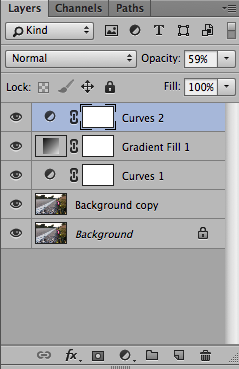
If you want to adjust the brightness, change the opacity on the Curves 2 layer.
To adjust the amount of warmth, change the opacity on the Gradient Fill 1 layer.



Would you like to download all of the daily downloads at once?
For a $5 minimum donation you can instantly download all 116 Lightroom presets and 60 Photoshop actions.
Instead of downloading and unzipping 176 files one by one, you can download 1 file.
All of the Lightroom presets are compatible with Lightroom 4, 5 and CC.
All of the Photoshop actions are compatible with the full version of Photoshop. CS1 – CC. They have not been tested with Photoshop Elements.
You can always continue to download individual presets and actions at no charge from the Free Daily Downloads blog.
Enter the email address that you would like your download sent to, at the bottom of this form, and a minimum of $5 USD. You will receive your download once your PayPal payment is complete.


 Free Download – Deeply Matte – Photoshop Actions
  Free Download – Gorgeous Redheads – Photoshop Actions
  Free Download – Monochrome Landscapes – Lightroom Presets
  Free Download – Pinhole Photography – Lightroom Presets
ce preset est uniquement pour Mac’s,.auriez vous la version PC?
merci
Hello,
This Photoshop action is compatible with both PC and Mac. Are you unzipping it and installing it into Photoshop?
Rachael